Hello! A few years ago I published a small post here called Business Central: How to get any Records in JSON format. The idea was simple and, to my surprise, it kept getting visits: a generic method that could take any record from Business Central and hand it back as JSON, without writing code for each specific table.
It was fun, but it was also a toy. It returned one record shape at a time, the JSON was hand-crafted, and it leaned on an unbound OData action. Since then I kept coming back to the same question in real integrations: what if one API could describe the whole tenant and stream the contents of any table out of it, without me writing a new endpoint every single time?
That is what I want to share today. I’ll call it a Universal Table API. It has two sides:
- Metadata: the tenant’s own data dictionary, every table and every stored column.
- Data: the contents of any table, streamed as generic
(record, column, value)cells, with keyset pagination so you can walk millions of rows safely.
The full source is on GitHub: https://github.com/ivanrlg/bc-universal-api. Let’s build it up piece by piece.
The idea
Business Central already exposes standard and custom APIs, but every one of them is a page you design and maintain for one specific entity. That works beautifully for a stable, contract-first integration. It works badly when the job is simply “get everything out”: feeding a data lake or a warehouse, seeding a reporting database, backing up part of a tenant, or handing raw records to an AI pipeline. For that kind of work, writing and versioning one API page per table is busywork, and it never really ends.
So instead of modelling entities, I model two very generic things:
- The dictionary. What tables and columns exist? That comes from the system virtual tables.
- The cells. What are the values in table X? That comes from reading the table reflectively with
RecordRefandFieldRef.
Two ideas, four endpoints, and you can pull the structure and the contents of practically anything in the tenant.
Part 1: The metadata API
Business Central keeps its own dictionary in system virtual tables. Two of them are all we need:
Table Metadata(2000000136), with one entry per table.Field(2000000041), with one entry per column.
The trick I like here is to serve the dictionary through a PageType = API page over a temporary buffer. The page has no persistent table behind it; it builds its rows in memory the moment it opens.
First, a tiny provider codeunit that copies the virtual tables into a buffer:
procedure LoadTables(var Buffer: Record "Metadata Table" temporary)
var
    Meta: Record "Table Metadata";
begin
    Buffer.Reset();
    Buffer.DeleteAll();

    // Retired tables would only be noise for a consumer building a replica, so drop them.
    Meta.SetFilter(ObsoleteState, '<>%1', Meta.ObsoleteState::Removed);
    if not Meta.FindSet() then
        exit;
    repeat
        Buffer.Init();
        Buffer."Table No." := Meta.ID;
        Buffer."Name" := Meta.Name;
        Buffer."Caption" := Meta.Caption;
        Buffer."Data Per Company" := Meta.DataPerCompany;
        Buffer."App Id" := Meta."App ID";
        Buffer.Insert(false);
    until Meta.Next() = 0;
end;
LoadColumns is the same shape over the Field table, with one deliberate filter: SetRange(Class, Class::Normal). FlowFields and FlowFilters are computed, never stored in SQL, so they have no place in a structural description meant to mirror what actually lives on disk. (That conclusion is the part of this article a reader pushed back on, rightly. See the update at the end.)
Now the API page. Notice it is temporary-sourced and read-only:
page 80005 "Tables API"
{
    PageType = API;
    APIPublisher = 'singleton';
    APIGroup = 'metadata';
    APIVersion = 'v1.0';
    EntityName = 'table';
    EntitySetName = 'tables';
    SourceTable = "Metadata Table";
    SourceTableTemporary = true;
    ODataKeyFields = "Table No.";
    Editable = false;

    layout
    {
        area(Content)
        {
            repeater(Group)
            {
                field(tableId; Rec."Table No.") { }
                field(name; Rec."Name") { }
                field(caption; Rec."Caption") { }
                field(dataPerCompany; Rec."Data Per Company") { }
                field(appId; Rec."App Id") { }
            }
        }
    }

    trigger OnOpenPage()
    var
        Provider: Codeunit "Metadata Provider";
        RequestView: Text;
    begin
        // Fill the buffer, but keep whatever $filter/$orderby the platform already parsed onto Rec.
        // DeleteAll() inside the provider clears those, so snapshot the view first and put it back.
        RequestView := Rec.GetView(false);
        Provider.LoadTables(Rec);
        Rec.SetView(RequestView);
    end;
}
That GetView/SetView dance is the small detail that makes this work. When a client calls the endpoint with $filter or $orderby, the platform has already applied those to Rec before OnOpenPage runs. My provider calls DeleteAll() to refill the buffer, which would wipe them, so I snapshot the view, refill, and put it back. OData then filters and sorts the freshly built buffer as if nothing had happened.
The endpoints:
GET /api/singleton/metadata/v1.0/companies({companyId})/tables
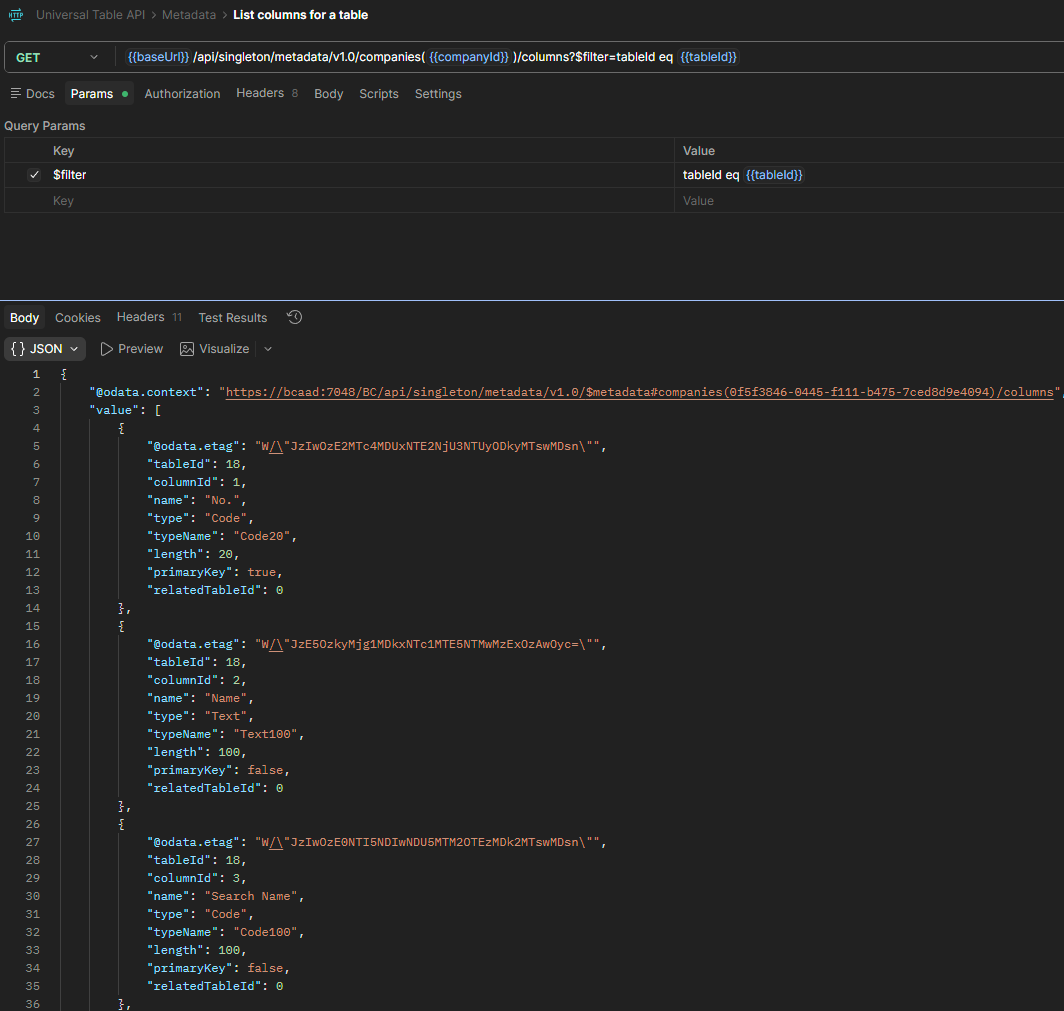
GET /api/singleton/metadata/v1.0/companies({companyId})/columns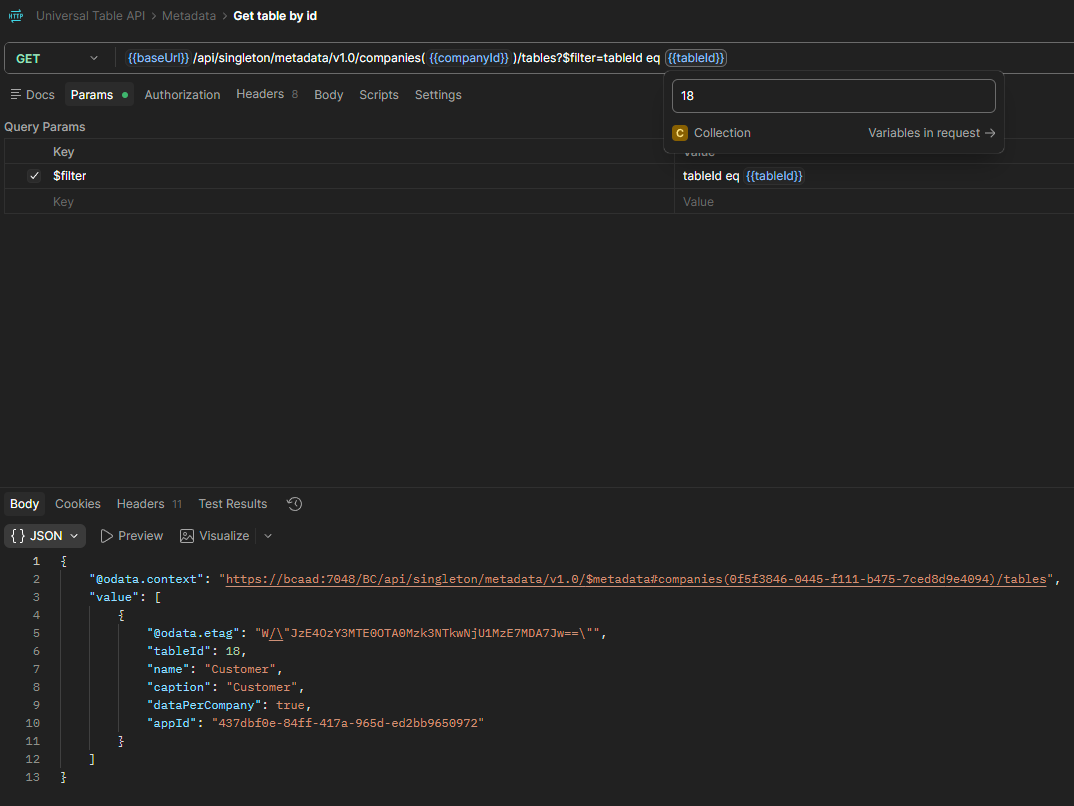
$filter to the buffer the page just built.A slice of the response for columns?$filter=tableId eq 18:
{
  "value": [
    {
      "tableId": 18,
      "columnId": 1,
      "name": "No.",
      "type": "Code",
      "typeName": "Code20",
      "length": 20,
      "primaryKey": true,
      "relatedTableId": 0
    },
    {
      "tableId": 18,
      "columnId": 2,
      "name": "Name",
      "type": "Text",
      "typeName": "Text100",
      "length": 100,
      "primaryKey": false,
      "relatedTableId": 0
    },
    {
      "tableId": 18,
      "columnId": 21,
      "name": "Customer Posting Group",
      "type": "Code",
      "typeName": "Code20",
      "length": 20,
      "primaryKey": false,
      "relatedTableId": 92
    }
  ]
}
The whole dictionary is small enough to build in memory on each request and let OData filter afterwards. For the data, that assumption falls apart, and that is where it gets interesting.
Part 2: The data API
Here is the core idea of the whole thing: read the values of any table generically, with no knowledge of its structure at compile time. That is exactly what RecordRef and FieldRef are for.
Open a table by its numeric id, walk every record, walk every field, and emit one row per value. The shape is deliberately “tall”, one row per cell, so that a single entity can carry the contents of any table:
procedure ReadCells(var Buffer: Record "Data Cell" temporary; TableNo: Integer; Cursor: Text)
var
    Source: RecordRef;
    SysIdNo: Integer;
    Limit: Integer;
    Emitted: Integer;
begin
    Buffer.Reset();
    Buffer.DeleteAll();

    if not CanRead(TableNo) then
        exit;

    Source.Open(TableNo);
    SysIdNo := Source.SystemIdNo();
    OpenWindow(Source, SysIdNo, Cursor);
    Limit := PageSizeInRecords(Source);

    // Find('-') walks only as far as the loop goes (a self-tuning TOP), so capping the loop caps
    // the SQL fetch too. FindSet would ask the server for the entire table up front.
    Emitted := 0;
    if Source.Find('-') then
        repeat
            EmitRecord(Buffer, Source, TableNo, SysIdNo);
            Emitted += 1;
        until (Source.Next() = 0) or (Emitted >= Limit);

    Source.Close();
end;
And the reflection itself:
local procedure EmitRecord(var Buffer: Record "Data Cell" temporary; var Source: RecordRef; TableNo: Integer; SysIdNo: Integer)
var
    Col: FieldRef;
    RowId: Guid;
    i: Integer;
begin
    // Read the identity straight from the live record; a temporary buffer will not assign it.
    RowId := Source.Field(SysIdNo).Value();
    for i := 1 to Source.FieldCount() do begin
        Col := Source.FieldIndex(i);
        if IsSerializable(Col) then begin
            Buffer.Init();
            Buffer."Table No." := TableNo;
            Buffer."System Id" := RowId;
            Buffer."Column No." := Col.Number();
            Buffer."Column Name" := CopyStr(Col.Name(), 1, MaxStrLen(Buffer."Column Name"));
            Buffer."Value" := CopyStr(Serialize(Col), 1, MaxStrLen(Buffer."Value"));
            Buffer.Insert(false);
        end;
    end;
end;
Two decisions worth calling out.
Which columns count. Not everything should travel. I keep only stored, app-level columns with a meaningful flat representation:
local procedure IsSerializable(var Col: FieldRef): Boolean
begin
    if Col.Class() <> FieldClass::Normal then
        exit(false);            // drop computed FlowFields/FlowFilters
    if Col.Number() >= 2000000000 then
        exit(false);            // drop platform/system columns
    exit(not (Col.Type() in [FieldType::Blob, FieldType::Media, FieldType::MediaSet,
                             FieldType::RecordId, FieldType::TableFilter]));
end;
How values are serialized. If you Format a value with the user’s locale, the same decimal or date looks different from one environment to the next, which is poison for an integration. So everything is culture-invariant with Format(_, 0, 9): ISO dates, a dot as the decimal separator, true and false. Options are a small gotcha. Format on the field would return the member name, so I read the value into an integer and emit the zero-based ordinal instead:
local procedure Serialize(var Col: FieldRef): Text
var
    Ordinal: Integer;
begin
    if Col.Type() = FieldType::Option then begin
        Ordinal := Col.Value();
        exit(Format(Ordinal, 0, 9));
    end;
    exit(Format(Col, 0, 9));
end;
The endpoint takes the table id as a filter:
GET /api/singleton/data/v1.0/companies({companyId})/cells?$filter=tableId eq 18and returns the contents of that table as cells:
{
  "value": [
    {
      "tableId": 18,
      "systemId": "01143d58-0445-f111-b475-7ced8d9e4094",
      "columnId": 1,
      "columnName": "No.",
      "value": "10000"
    },
    {
      "tableId": 18,
      "systemId": "01143d58-0445-f111-b475-7ced8d9e4094",
      "columnId": 2,
      "columnName": "Name",
      "value": "The Cannon Group PLC"
    },
    {
      "tableId": 18,
      "systemId": "01143d58-0445-f111-b475-7ced8d9e4094",
      "columnId": 21,
      "columnName": "Customer Posting Group",
      "value": "DOMESTIC"
    }
  ]
}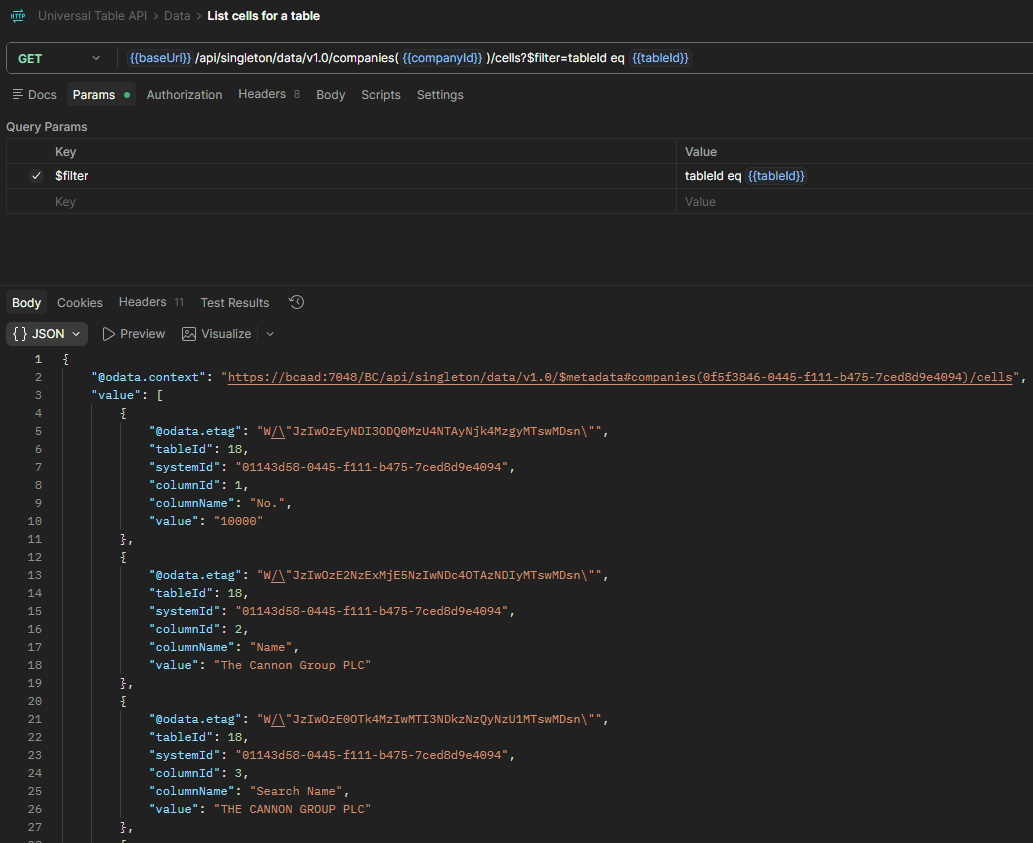
The consumer pivots those cells back into rows on its side, using systemId as the row identity. And because the shape is generic, narrowing the payload is just another filter. Ask for the columns you care about and nothing else:
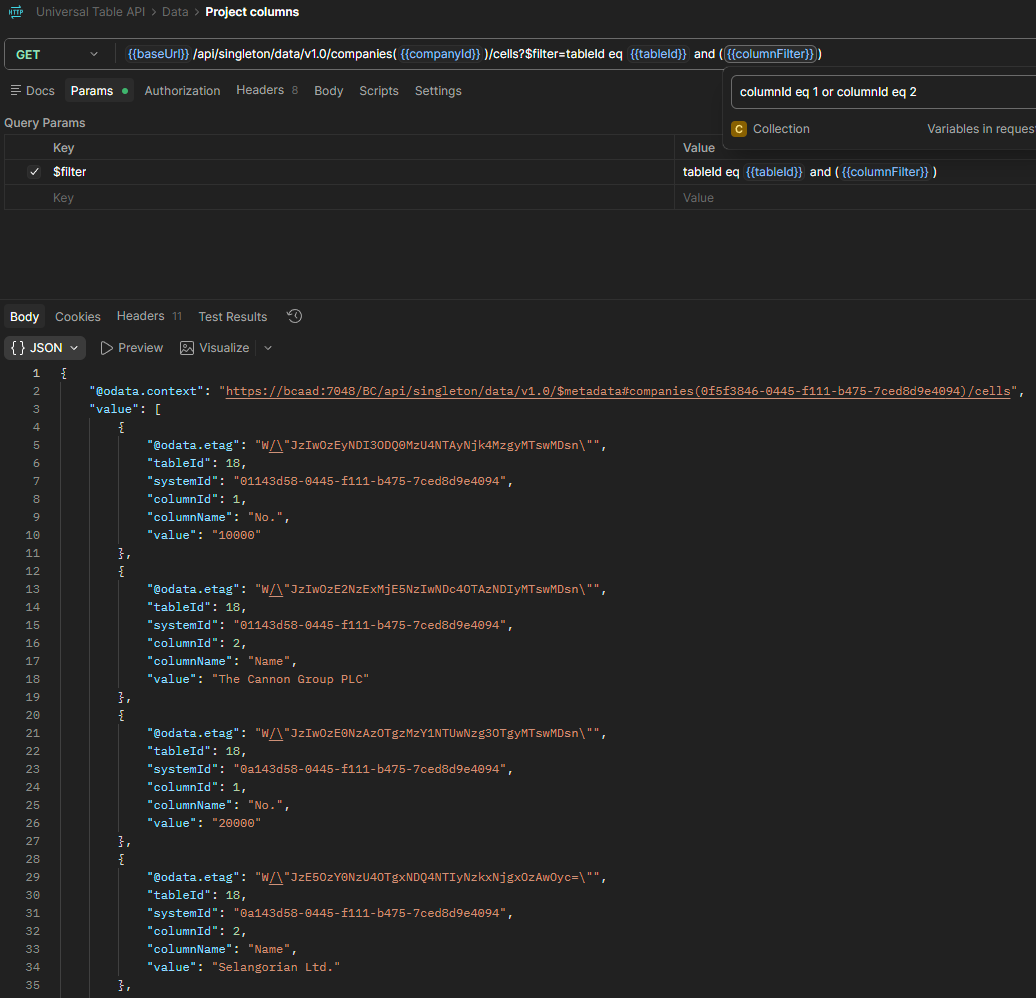
systemId values, each carrying its own No. and Name. These are exactly the pairs the consumer pivots back into rows.Which brings us to the part I find most satisfying.
Part 3: Keyset pagination that actually scales
A real table can have millions of rows. You cannot build them all in memory, and you cannot trust $skip: offset paging gets slower the deeper you go and can skip or repeat rows if data changes between calls. So I use keyset pagination on SystemId.
Every record has a SystemId (a GUID). If I always sort by it and always continue after the last one I saw, I get a stable, index-friendly cursor:
local procedure OpenWindow(var Source: RecordRef; SysIdNo: Integer; Cursor: Text)
var
    SortBySystemIdTok: Label 'SORTING(Field%1)', Locked = true;
begin
    // Sort by SystemId first; the cursor ("systemId gt {guid}" turned into ">{guid}" by OData)
    // is then applied as a plain filter on that same field. Order before filter so it survives.
    Source.SetView(StrSubstNo(SortBySystemIdTok, SysIdNo));
    if Cursor <> '' then
        Source.Field(SysIdNo).SetFilter(Cursor);
end;
The page reads the cursor straight from the incoming OData filter. The client’s systemId gt {guid} arrives as the AL filter >{guid}, and I hand it to the source read untouched:
trigger OnOpenPage()
var
    Provider: Codeunit "Data Provider";
    RequestView: Text;
    TableNo: Integer;
    Cursor: Text;
begin
    RequestView := Rec.GetView(false);
    if not Evaluate(TableNo, Rec.GetFilter("Table No.")) then
        TableNo := 0;
    Cursor := Rec.GetFilter("System Id");
    Provider.ReadCells(Rec, TableNo, Cursor);
    Rec.SetView(RequestView);
end;
So the consumer’s loop is dead simple: call the endpoint, remember the largest systemId you received, and call again with systemId gt {that value} until a page comes back empty.
GET .../cells?$filter=tableId eq 18
GET .../cells?$filter=tableId eq 18 and systemId gt {lastSystemId}
GET .../cells?$filter=tableId eq 18 and systemId gt {lastSystemId}
...
There’s one subtlety that took me a moment. Online OData caps a response at a fixed number of entities per page, and here an entity is a cell, not a record. If I paged by cells, a record’s cells could be split across two responses, which is a nightmare to pivot. So I size the window in records, derived from a cell budget: count how many cells one record emits, divide the budget by that, and stop the loop on whole records.
local procedure PageSizeInRecords(var Source: RecordRef): Integer
var
    Col: FieldRef;
    i: Integer;
    PerRecord: Integer;
    Size: Integer;
begin
    for i := 1 to Source.FieldCount() do begin
        Col := Source.FieldIndex(i);
        if IsSerializable(Col) then
            PerRecord += 1;
    end;
    if PerRecord <= 0 then
        exit(1);
    Size := CellBudget() div PerRecord;
    if Size < 1 then
        Size := 1;
    exit(Size);
end;
Every response is a single server page that ends on a complete record. No split records, no @odata.nextLink to chase, no offset drift. And because the read uses Find('-') with a bounded loop instead of FindSet, the server only fetches as far as the window walks.
A word on security
This is a powerful surface. It can read whatever the caller is allowed to read, so the interesting part is not really the code, it is the permissions.
There’s a real constraint in AL worth knowing: there is no “grant by table id”. tabledata "Customer" = R needs the Customer symbol at compile time, so you cannot write a permission set that says “read whatever table id shows up at runtime.” Each exportable table has to be listed explicitly:
permissionset 80009 "Data Read"
{
    Assignable = true;
    Permissions =
        tabledata "Table Metadata" = R,
        tabledata "Data Cell" = R,
        tabledata Customer = R,
        tabledata Item = R,
        codeunit "Data Provider" = X,
        page "Cells API" = X;
}
The sample ships Customer and Item as examples, and you add your own the same way. To be clear about what that does and does not cost: writing the list in AL means recompiling to change it, but nobody is forced to do it that way. An administrator can copy the permission set in the client and add tables to the copy without touching the code at all, and tabledata * = R grants read on everything in a single line. Keeping the list in AL is what I wanted here, because it puts the allow-list under source control where a reviewer can see it. Copying it in the client puts the same decision in the hands of whoever runs the tenant. Both beat granting SUPER, because either way the permission set stays the allow-list of what may leave.
Note too that the read is not wrapped in a TryFunction: a caller lacking read on a requested table gets a real HTTP 403 instead of a silent empty page, so “no rows” and “not allowed” never get confused.
The obvious shortcut, and why I did not take it
All of that list-keeping invites one question: why not grant SUPER and be done with it? Nothing to maintain, nothing to decide, everything works. For a throwaway container it is a perfectly good answer, and it is what I use in my own lab.
For a tenant with real data, it is worth knowing exactly what you are handing over. Microsoft’s own description of SUPER is that it “can read, use, update, and delete all data and all application objects”. It is not a read permission.
Now, the pages in this extension are genuinely read-only and that never changes. InsertAllowed, ModifyAllowed and DeleteAllowed are all false, and a POST comes back 405. But here is the part that took me a moment to internalise: Editable = false protects this endpoint. The permission set protects the token, and that token opens every other door on the server. One token, two requests a second apart on my container:
POST  /api/singleton/data/v1.0/.../cells        -> 405  rejected
PATCH /api/v2.0/companies(...)/customers(...)   -> 200  accepted
The second URL is the standard API that ships with every Business Central. I did not publish it and I cannot switch it off from my extension. So the real question is not how much I want my API to read. It is what happens the day that client secret ends up in a CI log or a config file somebody committed. With an allow-list, whoever finds it reads Customer and Item. With SUPER, whoever finds it can empty the tenant, and not through my API at all.
I went looking for a middle option and there is not much of one. SUPER (DATA) also updates and deletes. BASIC grants broad read access but only exists on-premises. Which is a slightly uncomfortable conclusion: the tidy shortcut and the safe answer really are different answers, and you have to pick.
SUPER principal, which is what a freshly wired service-to-service app often ends up being, every table answers 200, because SUPER really can read them all. To see the permission model do its job, assign only the two permission sets to a non-SUPER user or app.
Beyond that, the usual rules apply, only harder. Expose this to trusted, authenticated integrations and nothing else (a service-to-service app with a tightly scoped permission set), and never to the open internet. I built and tested all of this on a local Docker container with Azure AD set up for OAuth2. If you want to get that kind of service-to-service authentication working on an on-prem or Docker instance, I wrote the whole setup up separately: How to configure OAuth2 on Business Central on-prem (Docker).
Wrapping up
That is the whole thing: two system virtual tables for the schema, RecordRef and FieldRef for the data, and a keyset cursor on SystemId to make it scale. The toy JSON exporter I wrote a few years ago has grown into one API that can describe a tenant and stream almost any table out of it. And I never had to write a single line of code for Customer, or Item, or any other table in particular. That was the whole point.
The complete extension, permission sets included, is on GitHub: https://github.com/ivanrlg/bc-universal-api. The code is open, so fork it, open an issue, or send a pull request if you take it somewhere interesting.
And there is plenty of room to take it somewhere interesting. Paging is the obvious place to start. Right now the page size comes from a fixed cell budget baked into the reader, when it would be far more useful if the caller could ask for a size, or if it grew and shrank on its own depending on how wide the table is. In that same area, the API always reads a table from the very beginning, so an incremental mode that returns only what changed since a given moment would turn a full nightly reload into a small delta. SystemModifiedAt is sitting in every table waiting for exactly that. Past paging there is more: pushing filters down to the source, letting the caller pick the columns, or keeping a manifest of which tables may be exported at all.
Take it, break it, and adapt it to what you need. I hope it helps!
Update: FlowFields, thanks to a good question
That invitation got taken up faster than I expected. El Mehdi TAHER read the post and asked the obvious question I had waved away: why not load the FlowFields too? They are not stored, true, but they can be calculated.
He was right, and my reasoning above is the weak part of this article. FieldRef.CalcField() exists precisely for this. “It is not stored” explains why a FlowField arrives as zero; it does not explain why the API should refuse to calculate it.
The real objections turned out to be different ones, and neither argues for hiding FlowFields, only for asking first. The first is cost: every FlowField is an aggregate query per record, and one page of 68 customers went from 847 ms to 3.9 seconds once they were switched on. The second is permissions, which is the interesting one. Balance is calculated from Cust. Ledger Entry and Sales (LCY) from Value Entry, and neither table is in the permission set. A FlowField reads straight past the allow-list that the whole security model rests on.
So as of v1.1.0 they are served on request:
GET .../cells?$filter=tableId eq 18 and includeFlowFields eq trueEvery cell now reports whether it was computed, because an aggregate read at one moment in time is not a fact worth storing downstream the way No. or Name is. The dictionary reports FlowFields as well, each flagged with whether /cells will actually return it, so you can see what exists before asking for it. Turning it on means granting read on the tables behind each CalcFormula, which is a deliberate widening of the allow-list rather than something that happens quietly.
Chasing this also turned up a real bug that had nothing to do with FlowFields. The metadata endpoint was advertising 109 columns for Customer while the data endpoint only ever emitted 103, because each side decided independently what counted as exportable. Anyone sizing a replica from the dictionary would have sat waiting for six columns that were never coming. That rule now lives in one place and both sides ask it.
Which is a better argument for publishing the code than anything I wrote above. Thanks, El Mehdi.